Introduction
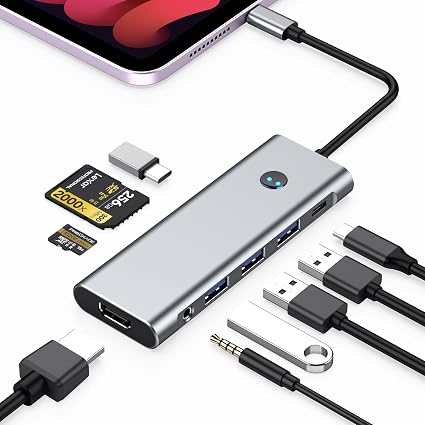
In a world where we are constantly on the move and craving efficiency, the BKELHS 9-in-1 USB-C Hub emerges as a savior for tech enthusiasts, professionals, and everyday users alike. If you’ve ever been frustrated by the limited ports on your iPad Pro or other similarly endowed devices, this sleek and multifaceted gadget could just redefine how you connect and conquer your daily tasks. Picture this: You’re at a cafe, sipping on a cappuccino, editing a presentation on your iPad, and suddenly find the need to connect to multiple peripherals at once. A daunting idea? Not anymore.
Pros & Cons
- Pros:
- Enormous Connectivity: With a total of 9 ports, it turns a solitary USB-C slot into a powerhouse of options.
- Pass-Through Charging Convenience: Keeps your workflow seamless with up to 100W of charging power while using the other ports.
- High-Resolution Output: The HDMI port supports vivid 4K@60Hz display, perfect for extending your screen.
- Compact and Portable: Ideal for travel and on-the-go lifestyles, without the bulk.
-
Multi-device Compatibility: Works not just with iPad Pro, but also with tablets, laptops, and more.
-
Cons:
- Price Point: Some might find it slightly upscale, especially those seeking basic connectivity options.
- Volume Controls: Adjusting volume with some peripheral headphones might require a bit of finessing.
- Device-Specific Fit: While it claims wide compatibility, some devices may require slight adjustments for a snug fit.
Comparison
In the bustling market of tech accessories, the BKELHS 9-in-1 USB-C Hub stands out not just by its ports, but by its efficiency. Competing against brands like Anker and Satechi, which offer similar multi-port hubs, BKELHS captures attention with its robust charging capabilities and diverse functionality. While Anker focuses on minimalist design and Satechi emphasizes premium finishes, BKELHS is all about giving you the most value via functionality, particularly with its high-power pass-through charging and broad compatibility range.
User Tips / Usage Guide
- Maximize Slot Utilization: Assign different tasks to each port, like charging through PD, data transfer via USB 3.0, and media display through HDMI for a holistic workspace.
- Priority Charging: Use a 30W or higher USB-C power adapter to ensure that your iPad and the hub function optimally with all ports active.
- Screen Share on the Spot: Planning for meetings? Connect the HDMI to project your iPad's screen in no time.
- Monitor Charging: Despite the high charging capacity, check your power source's wattage before plugging in to avoid overload.
- Offload Quickly: Transfer heavy files expediently using the USB 3.0 port to maintain speed and efficiency.
- Check Settings for Audio Control: Adjust audio output settings on your device if there are issues with connected headphones or microphones.
- Use with Caution Around Liquids: While robust in function, like any tech gadget, maintain safe distances from liquids to prolong its lifespan.
Conclusion
The BKELHS 9-in-1 USB-C Hub for iPad Pro, with its extensive port availability and practical features, transforms the way you interact with your devices. It’s more than just a hub—it's a mobile adaptability station that suits the fast-paced, technologically entwined life many of us lead today. The remarkable charging support and a plethora of port options assure you that this isn't just an addition to your workflow but an enhancement. So, whether you’re a creative, a business professional, or simply someone who loves convenience at their fingertips, this product promises to simplify and streamline your digital interactions. In short, if expanding your device's capabilities is in order, BKELHS 9-in-1 USB-C Hub is undeniably worth considering.