Introduction
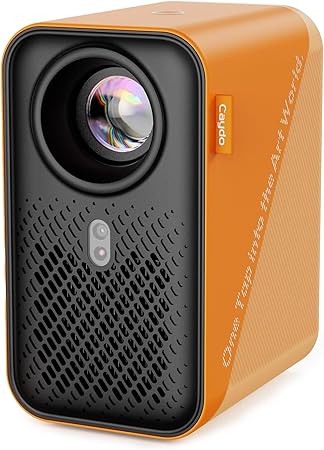
The Caydo P1 Art Projector immediately caught my eye as a tool that promised to reinvent the way artists approach their work. My initial skepticism stemmed from the often exaggerated claims made by tech gadgets about their ability to transform creativity. However, as an artist who frequently uses digital tools, the idea of effortlessly projecting designs onto various surfaces, combined with a dedicated app for drawing, seemed intriguing enough to explore. But was this gadget a genuine game-changer or simply another fleeting novelty in a crowded market? I decided to put the Caydo P1 through its paces to find out.
Pros & Cons
- Pros:
- Built-in Exclusive Art Drawing App helps simplify the artistic process with features like flexible zoom, 360° image rotation, and 3x3 grids.
- Effortless image transfer via the app or a USB drive ensures a seamless start to your creative work.
- Auto Focus & Keystone correction offers precise image scaling and prevents distortion.
- Ultra fast dual-band WiFi and Bluetooth enhances connectivity for smoother performance and audio options.
-
Compact and portable design with a projected lamp life of up to 10,000 hours.
-
Cons:
- Native resolution of 1280 x 720 could be limiting when finer detail is required.
- Despite having a built-in app, true artistic freedom might still depend heavily on the quality of the source material.
- The absence of included AAA batteries for the remote is a bit inconvenient.
- Bluetooth function supports only audio transmission, lacking support for video.
Comparison
When weighed against similar products, like the Artograph EZ Tracer and the AAXA P300 projector, the Caydo P1 stands out for its built-in app and dual-band WiFi, which offer a distinct advantage in terms of smart functionality. The EZ Tracer, while more affordable, lacks the image clarity and advanced features offered by the Caydo P1. The AAXA P300, though superior in native resolution, doesn't come with the specialized drawing app, making the Caydo P1 an appealing choice for those prioritizing seamless integration with their artistic workflow.
User Tips / Usage Guide
- Update the App: Ensure the drawing app is updated to the newest version (1.8) for the best experience.
- Calibrate before Use: Spend time properly setting up the auto focus and keystone to adapt to your preferred working distance.
- Optimize Lighting: For the best projection quality, use the Caydo P1 in a dimly lit room.
- Stability is Key: Use a stable, flat surface to avoid unnecessary movement or image blur.
- Utilize Bluetooth Wisely: Enhance your experience by pairing with high-quality external speakers or headphones.
- Experiment with Modes: Explore the different drawing modes like Gridify and Sketchify to find which best complements your style.
- Preserve Battery: Keep extra AAA batteries on hand for the remote, given they’re not included.
- Dust Maintenance: Regularly check and clean the lens cover to maintain image clarity and projector performance.
Conclusion
The Caydo P1 Art Projector shines as a multifunctional tool aimed at artists and creatives who need to project designs efficiently onto surfaces. Although initially skeptical, I was surprised by the convenience it injects into the artistic process, especially with features like automatic keystone correction and app-based image transfers. While its native resolution might not satisfy every professional need, the additional functionalities and portability make it suitable for both amateur and professional artists as well as for hybrid home use. If you’re an artist who values integrated tech without wanting to break the bank on professional-grade projectors, the Caydo P1 merits your consideration.