Introduction
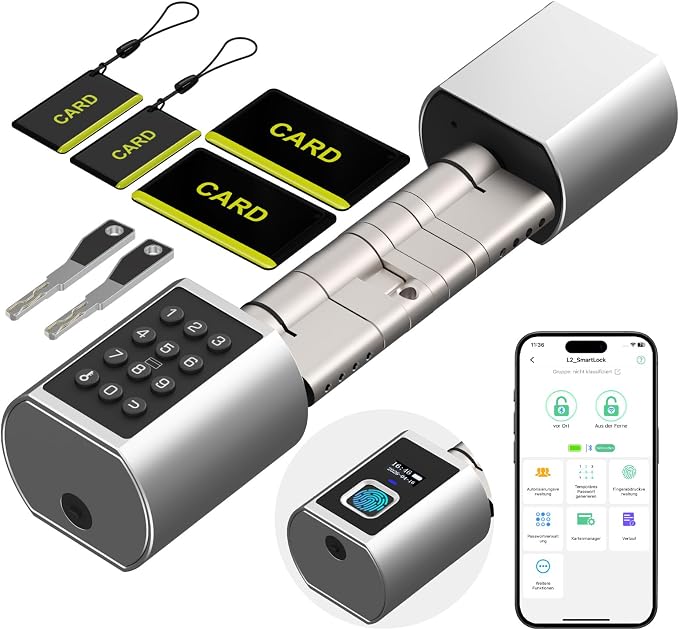
In a world that's constantly evolving with smart technology, traditional keys seem almost antiquated. Enter the eLinkSmart Wi-Fi Fingerprint Door Lock—a sleek, futuristic gatekeeper promising security at the tip of your fingers. Imagine the daily ease of never fumbling for keys again, a game-changer for anyone from busy professionals to Airbnb hosts. With its integrated Wi-Fi, there's no need for additional hardware, making it incredibly user-friendly. This door lock matters because it transforms how we secure our homes, offering both convenience and peace of mind.
Pros & Cons
- Pros:
- Six unlocking methods, providing flexibility for every individual.
- Quick installation with no drilling required.
- Waterproof (IP65), suitable for all weather conditions.
- Built-in Wi-Fi, eliminating the need for a separate gateway.
-
Real-time usage tracking via the app.
-
Cons:
- Requires periodic recharging or power bank use.
- May require time to familiarize with app features.
- Limited in color and design choices.
Comparison
When compared to other smart locks like the August Smart Lock and Schlage Encode, the eLinkSmart stands out for its Wi-Fi integration without a bridge, offering seamless and straightforward connectivity. While August uses a separate bridge for remote access, and Schlage offers a sleek keypad-only design, eLinkSmart combines fingerprint access with multiple entry methods. And let’s not forget the mechanical backup keys, for those who prefer a bit of analog comfort.
User Tips / Usage Guide
-
Setup is Easy: Begin by measuring your door thickness to ensure a perfect fit. No need to call a handyman; the lock is designed for DIY installation.
-
Familiarize with the App: Spend a few minutes exploring the app. It allows for access management, real-time logs, and lock settings from anywhere.
-
Enroll Fingerprints and PINs: Take your time to enroll the fingerprints and set up the PIN codes for quick and hassle-free access.
-
Backup Power Awareness: Regularly check the power level through the app. If low, charge via USB-C or have a power bank on hand.
-
Grant Temporary Access: For guests or service providers, use the time-limited keys feature.
-
Set Up Notifications: Enable notifications in the app to stay informed about lock activity for enhanced security.
-
Routine Maintenance: Periodically clean the fingerprint sensor for optimal performance.
-
Emergency Key Use: Familiarize yourself with the mechanical key function in case of emergency power failure.
Conclusion
The eLinkSmart Wi-Fi Fingerprint Door Lock is more than just a lock; it's a gateway to modern living. After a week of daily use, the convenience it offers is undeniable. Whether you're juggling groceries or managing an Airbnb, the ability to control access from anywhere simplifies life in unexpected ways. For those adopting the smart home lifestyle, this lock is an essential. With its reliable security and ease of use, the eLinkSmart door lock is a worthy investment for the tech-savvy homeowner.