Introduction
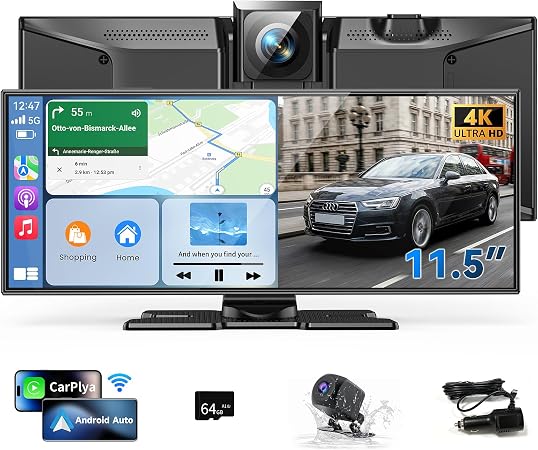
In today's ever-connected world, upgrading your vehicle's infotainment system can dramatically enhance your driving experience. The Kuayvan 11.5" Wireless CarPlay Screen provides an appealing solution for those seeking to integrate Apple CarPlay or Android Auto into their vehicle without the need for a comprehensive overhaul. With features like a large display, wireless connectivity, a 4K dash cam, and a backup camera, this product aims at delivering an all-in-one multimedia experience on the road.
Pros & Cons
- Pros:
- Large 11.5" display, enhancing visual clarity
- Seamless integration with Apple CarPlay and Android Auto
- 4K dash cam provides excellent image quality and captures clear video evidence
- 1080p backup camera ensures safe reversing even in bad weather
- Generous 64GB storage supporting loop recording
- Multi-option audio output (speakers, FM, AUX)
-
Voice control via Siri and Google Assistant for hands-free operation
-
Cons:
- Can face compatibility issues with Android 16 unless using the EveLink app
- May require technical support if installation instructions are not followed properly
- Size could potentially obstruct visibility if not mounted correctly
Comparison
When compared to other portable infotainment systems like the Boss Audio Systems BCPA10RC or the Pyle PLTS78DUB, the Kuayvan 11.5" Wireless CarPlay Screen offers a larger screen and integrated 4K dash cam, making it a better choice for those who prioritize visual capability and safety documentation. However, it's slightly pricier than other models, but for the price, you get more extensive features and convenient wireless integrations.
User Tips / Usage Guide
-
Proper Installation: Ensure the screen is mounted in a position that does not obstruct your view. Follow the user manual closely for a hassle-free installation.
-
App Syncing: For Android users on version 16, ensure you install the EveLink app to prevent disconnections.
-
Camera Setup: Regularly check the alignment and cleanliness of the dash and backup cameras to maintain clear video evidence.
-
Sound Quality: Use the AUX output for better sound quality through your car's native audio system.
-
Storage Management: Regularly backup your dash cam videos to avoid automatic overwrites once the 64GB storage is full.
-
Voice Commands: Familiarize yourself with Siri or Google Assistant commands to optimize the hands-free experience.
-
Firmware Updates: Periodically check for any system or app updates to keep functionality smooth and reliable.
-
Weather Conditions: Always check the tightness of the rearview camera to ensure its waterproof capabilities remain intact.
Conclusion
For budget-conscious shoppers looking for a value-packed addition to their vehicle, the Kuayvan 11.5" Wireless CarPlay Screen stands out as an excellent choice. Although it demands a higher initial investment compared to simpler models, where it really earns its keep is in its multifaceted functionality and large display. It's particularly well-suited for older vehicles lacking built-in infotainment features. If you're willing to navigate occasional setup nuances, this product can significantly elevate your driving satisfaction without compromising on safety or quality.