Introduction
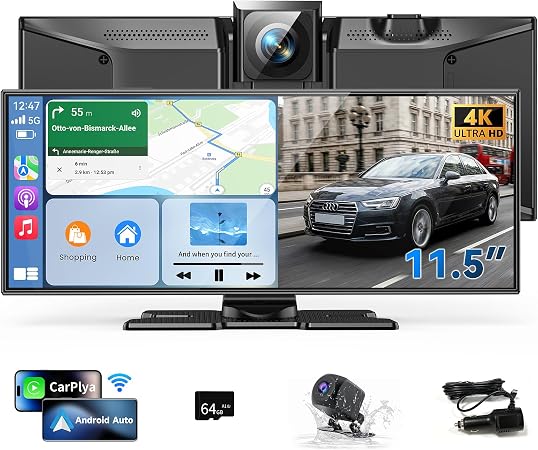
The Kuayvan 11.5" Wireless Carplay screen aims to bridge the technological gap often found in older vehicles' infotainment systems. By integrating both Apple CarPlay and Android Auto compatibility, it caters to drivers wanting a contemporary entertainment and navigation solution. It also resolves the common issue of insufficient or outdated dashboard displays by offering an expansive screen paired with advanced safety features like a 4K front dash cam and a 1080p rear camera.
Pros & Cons
- Pros:
- 11.5" large HD screen improves visibility without obstructing driver’s line-of-sight
- Supports seamless integration with Apple CarPlay and Android Auto
- Equipped with a high-resolution 4K dash cam and 1080p backup camera
- Built-in 5GHz Wi-Fi for faster data transfer
-
64GB storage supports DVR loop recording for continuous video capture
-
Cons:
- Complicated setup process for Android 16 users
- Requires external app for full functionality
- Dependence on an external memory card for video recording
- Audio quality may depend on external connections
Comparison
When compared to similar products in the market, the Kuayvan stands out due to its large screen size and multitasking ability, merging 4K dash cam capabilities with infotainment features in one unit. For instance, the standard 7" car screens often found in competitor products pale in comparison in terms of visibility and utility. Additionally, most other car displays lack the comprehensive combination of a dual camera system and robust voice command features, making the Kuayvan an all-in-one tool for modern driving.
User Tips / Usage Guide
- Positioning the Screen: Optimal placement is crucial. Ensure visibility without obstruction, typically near the car's center console.
- Initial Setup: Follow instructions carefully, especially if your phone uses Android 16. Download requisite apps for seamless connectivity.
- Memory Management: Regularly manage the 64GB storage. Frequently delete unwanted files to maintain space for important recordings.
- Weather-Proof Setup: Ensure the rear camera is securely mounted and, if needed, waterproofed to maintain functionality in adverse weather.
- Utilizing Voice Control: Familiarize yourself with Siri or Google Assistant commands to optimize hands-free operational efficiency.
- Audio Output Selection: Experiment with various audio output modes - internal speakers, FM, or AUX - for best sound quality matching your vehicle's audio setup.
- Regular Software Updates: Check for updates to the screen's firmware and associated apps to ensure functionality remains top-notch and secure.
- Dash Cam Calibration: Periodically adjust the dash cam settings for optimal video quality and functionality based on local driving conditions.
Conclusion
The Kuayvan Wireless Carplay Screen is ideally suited for tech-savvy drivers who require cutting-edge technology in a single, integrated package. It is especially beneficial for users who spend considerable time on the road, frequently face varying driving environments, and need a reliable infotainment system combined with advanced safety features. Its extensive compatibility and versatile functionality make it a robust choice for those looking to modernize an older vehicle's in-car experience without the need for costly replacements or modifications.