Introduction
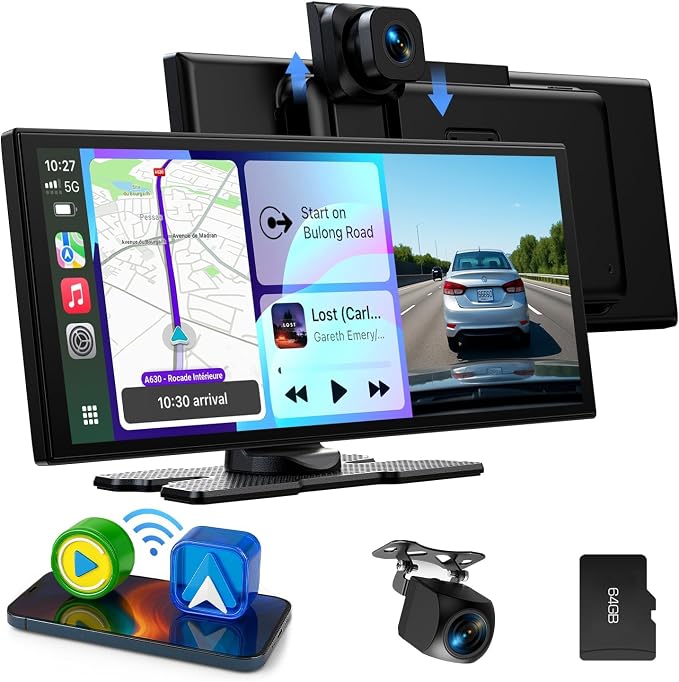
The LAMTTO Wireless CarPlay Android Car Display aims to solve the issue of outdated vehicle infotainment systems in older cars, trucks, and RVs. Many drivers still rely on standalone GPS devices or factory systems without modern integration features. With its large 10.25-inch in-cell touchscreen, this product combines wireless CarPlay and Android Auto capabilities with integrated front and rear dash cams, offering a comprehensive driving solution.
Pros & Cons
- Pros:
- Large 10.25-inch IPS screen enhances visibility.
- Wireless CarPlay and Android Auto support for ease of use.
- Integrated 2.5K front and 1080P rear dash cams for improved safety.
- Split-screen functionality allowing simultaneous navigation and communication.
- Voice control via Siri and Google Assistant simplifies operation.
-
Flexible audio outputs include built-in, Bluetooth, FM, and AUX options.
-
Cons:
- Not compatible with some vehicle brands (e.g., BMW, Tesla).
- Limited support for certain smartphones (e.g., Huawei, Xiaomi).
- Requires manual installation and setup, which could be complex for some users.
Comparison
When compared to similar products like the Pioneer AVH-W4500NEX or the Kenwood DMX9707S, the LAMTTO CarPlay Display distinguishes itself with its larger screen size and in-cell touchscreen technology, providing superior visual clarity. Although these alternatives offer similar CarPlay functionality, they generally lack the integrated dash cam feature that LAMTTO provides. However, the Pioneer model offers broader smartphone compatibility.
User Tips / Usage Guide
-
Installation: Follow the user manual for step-by-step guidance. Position the screen to avoid obstructing the driver's view.
-
Smartphone Compatibility: Ensure your smartphone runs iOS 11+ or Android 11+ for seamless CarPlay and Android Auto experience.
-
Voice Control: Utilize Siri or Google Assistant for hands-free operation to improve driving safety.
-
Screen Positioning: Adjust the front camera vertically according to vehicle type for optimal recording angles.
-
Split Screen Usage: Familiarize yourself with the split-screen functionality to manage navigation alongside other apps effectively.
-
Storage Management: Use the included 64GB TF card for dash cam footage. Regularly back up important videos to prevent data loss.
-
Audio Output Selection: Test each audio output option to determine the best sound quality in your vehicle setup.
-
Firmware Updates: Periodically check for any device updates to ensure you have the latest enhancements and bug fixes.
Conclusion
The LAMTTO Wireless CarPlay Android Car Display is best suited for those looking to modernize their older vehicles with a contemporary infotainment system. Its large screen, wireless integration, and dual dash cams make it an attractive choice for drivers prioritizing both multimedia capabilities and on-road safety. However, potential buyers should consider their smartphone compatibility and willingness to undertake DIY installation.