Introduction
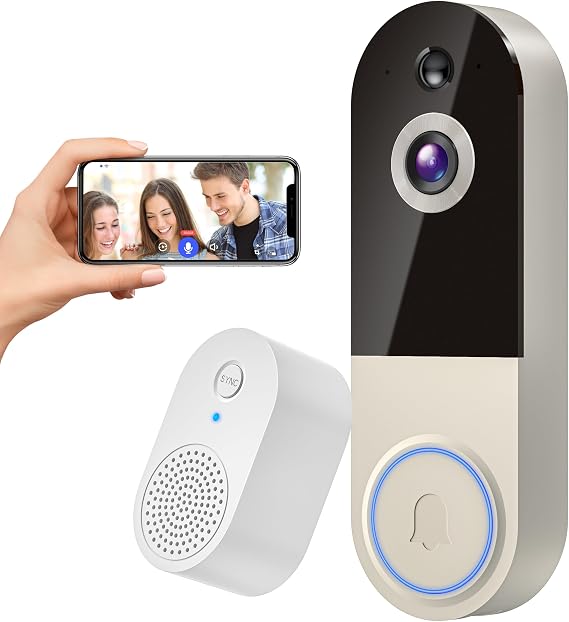
When it comes to home security, a reliable video doorbell can serve as an essential component of a comprehensive strategy. Enter the NexoSora 1080p Wireless Doorbell Camera. Initially, I approached this device with a degree of skepticism, especially considering the crowded market of security gadgets. With promises of AI human detection, two-way audio, and infrared night vision, among other features, it sounded almost too good to be true for its price range. However, I was curious to see if it lives up to these claims.
Pros & Cons
- Pros:
- High-definition 1080p video quality offers clear image details.
- AI-enhanced notifications minimize false alerts by detecting human activity.
- Seamless integration with the indoor receiver ensures that the doorbell notifications are always heard.
- Supported two-way audio allows for real-time communication.
- Night vision capability provides reliable security in low light.
-
Shareable access for multiple users is advantageous for families.
-
Cons:
- Cloud storage requires a subscription for access, which is not ideal for budget-conscious users.
- Uses only 2.4Ghz Wi-Fi, lacking dual-band support which might enhance connectivity.
- Needs frequent recharging depending on usage, during high-activity periods.
- The initial setup can be intimidating for non-tech users.
- Limited field of view compared to some premium models.
Comparison
Compared to its competitors, like Ring and Arlo, the NexoSora doorbell camera proves to be a budget-friendly option with fewer frills but ample basic functionality. While Ring offers a wider field of view and Arlo boasts a more robust weather-resistant design, the NexoSora manages to keep essentials like AI notifications and night vision active without breaking the bank. It's particularly suitable for users who prioritize function over having the latest cutting-edge features.
User Tips / Usage Guide
- Optimize Wi-Fi Setup: Ensure your router is positioned close to the door or consider a Wi-Fi extender to maintain strong connectivity.
- Cloud Storage Plan: Budget for the optional cloud storage service if continuous footage is essential for you.
- Install at Eye-Level: For optimal performance and motion detection, mount the unit at about eye level where most faces will be captured.
- Share Access Efficiently: If utilizing family sharing, educate members on how to utilize the app effectively.
- Regular Charging: Keep an eye on battery levels, especially if installed in a busy area; schedule recharging as needed.
- Test Alerts: Periodically test the motion alerts to ensure the AI is functioning properly in detecting only human activity.
- Review at Night: Confirm that your night vision settings are capturing as expected by conducting a night check.
- Maintenance: Regularly clean the camera lens and ensure there are no obstructions to maintain image clarity.
Conclusion
The NexoSora 1080p Wireless Doorbell Camera proves to be an impressive contender in the realm of budget-friendly home security solutions. Against my initial expectations, it offers a robust set of features that are generally user-friendly and effective for everyday use. This product is particularly well-suited for individuals or families seeking a functional, cost-effective video doorbell solution without needing advanced features like dual-band support or ultra-wide viewing angles. If you're after a no-nonsense device that does the job without the hype, this might just be the right choice for you.