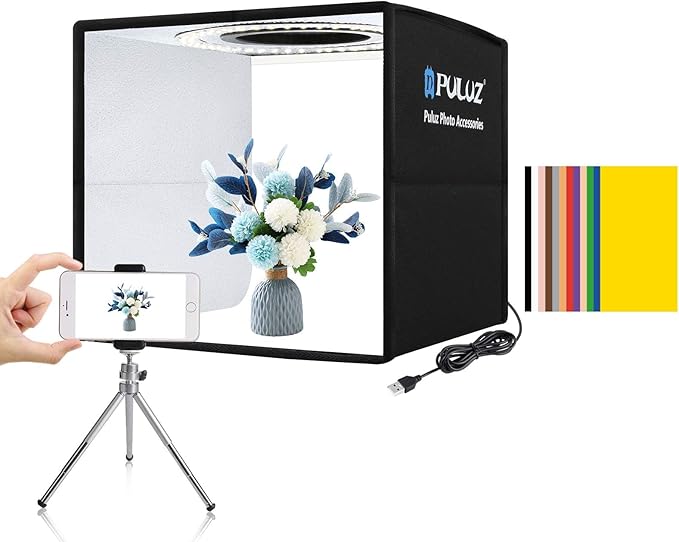
Introduction – Describe the problem this product solves
The PULUZ Mini Photo Box aims to address the challenges faced in small product photography, especially for amateurs and professionals who require consistent lighting and a clean backdrop. With small items such as jewellery, gadgets, and accessories, achieving optimal lighting without extensive equipment is challenging. Traditional photography setups are often cumbersome and not cost-effective for small-scale projects. The PULUZ Mini Photo Box eliminates these issues by providing a compact, portable, and easy-to-assemble studio that ensures high-quality images with minimal effort.
Pros & Cons
- Pros
- Compact size ideal for tight spaces and on-the-go photography
- High brightness due to 104 LED lights, offering superior illumination
- High Colour Rendering Index (CRI) > 95 ensures accurate colour depiction
- Multiple shooting angles supporting versatile photography styles
- Easy assembly, perfect for quick setups
-
Includes six double-sided background options for varying aesthetics
-
Cons
- Limited to small-scale products; not suitable for large items
- Oxford cloth material might not appeal to all users for durability reasons
- Fixed dimensions may restrict creativity in framing options
Comparison – Short comparison with similar items
Compared to other mini photo boxes within its category, the PULUZ Mini Photo Box distinguishes itself with its high-quality LED light integration and a CRI exceeding 95, which is a rarity at its price point. A competitor product, such as the Glendan Portable Photo Studio, offers similar lighting but at a higher cost and typically without the versatility of double-sided backgrounds. The PULUZ box also assembles faster than most alternatives, reducing setup time significantly.
User Tips / Usage Guide
- Background Selection: Utilize the six double-sided background options strategically to complement the item's color, enhancing the photo's visual appeal.
- Lighting Adjustment: Manage the lighting by experimenting with different window angles to reduce harsh shadows and hotspots.
- Product Placement: Center your product to utilize the lighting evenly and avoid any edge reflections.
- Camera Settings: Use a camera with manual mode to adjust ISO and white balance for better control over the photo's exposure and warmth.
- Maintenance: Regularly clean the inside of the box and backgrounds to ensure no dust or debris affects image quality.
- Tilt Angles: Experiment with front horizontal and vertical angles to capture different perspectives of your product.
- Transport: Fold the studio and store it in its carrying case after use to prevent damage and maintain portability.
- Ambient Lighting: If possible, shoot in a dark room to prevent external lighting from interfering with the shoot's light balance.
Conclusion – Summarize ideal buyers
The PULUZ Mini Photo Box is quintessential for photographers, artists, and online vendors who focus on small products like jewellery and electronics. Its lightweight, easy-to-set-up design caters to those who require portability without sacrificing professionalism. It's also well-suited for individuals working in limited spaces, thereby offering high performance where traditional setups aren't feasible. For users who prioritize accurate color representation and streamlined photography sessions, this product is an optimal choice.
Disclaimer: This post contains affiliate links. If you purchase through these links, we may earn a small commission at no extra cost to you.