Introduction
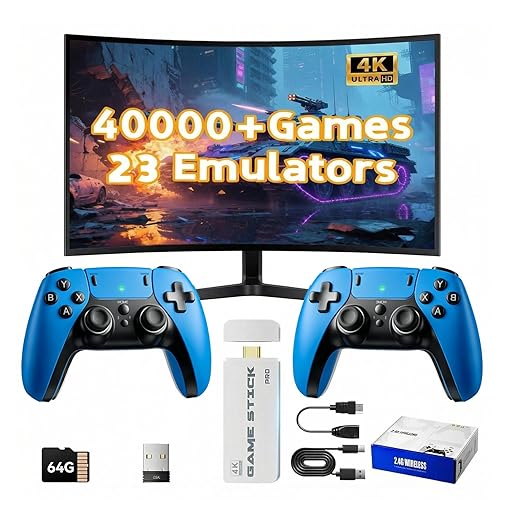
In the realm of classic gaming, the barrier to entry often involves a tangle of vintage consoles, physical cartridges, and inconvenient connectivity. The Retro Game Console Stick 4K addresses these issues by offering a comprehensive, all-in-one solution for retro game enthusiasts who want a seamless integration with modern TV sets. This device aims to simplify retro gaming by providing an easy, plug-and-play experience without the hassles of complicated setup, internet requirements, or additional purchases.
Pros & Cons
- Pros:
- Over 40,000 preloaded games offer an extensive variety.
- Supports 23 different emulators, consolidating multiple gaming experiences into a single device.
- 4K HDMI output enhances visual experience on modern displays.
- True plug-and-play functionality requires zero technical setup.
-
Includes two wireless controllers for effortless multiplayer gaming.
-
Cons:
- Lack of internet connectivity means no updates or new game downloads.
- Wireless controllers depend on battery life, potentially interrupting gameplay.
- Some emulators may not perfectly replicate original hardware experience.
- Limited to games preloaded, offering no customization for adding new titles.
Comparison
Compared to other retro gaming solutions like the Nintendo Classic Mini or Sega Genesis Mini, the Retro Game Console Stick 4K provides a much broader range of games and emulator support without brand restriction. Unlike systems like the Raspberry Pi, it doesn't require additional setup or technical expertise, making it more accessible to casual users. However, it lacks the build customization options that DIY enthusiasts might seek, available in more open systems.
User Tips / Usage Guide
-
Initial Setup: Simply connect the console stick to your TV’s HDMI port and plug it into power. Ensure the TV is switched to the appropriate HDMI input to begin enjoying games instantly.
-
Controller Sync: Make sure to insert batteries into the wireless controllers and press the sync button to connect to the console. This optimizes response times and prevents desync issues.
-
Explore Game Library: Take some time to explore the extensive game library. Use genre or era filters to find specific favorites quickly.
-
Regular Battery Checks: For uninterrupted gameplay, periodically check controller battery levels, especially before extended play sessions to prevent unexpected shutdowns.
-
Resolution Settings: Adjust the TV display settings for the best visual experience. Some TVs may require adjusting the picture ratio for optimal clarity.
-
Careful Handling: Avoid over-bending or straining the HDMI connection port, as it may lead to connectivity issues over time.
-
Multiplayer Fun: Make use of the dual controllers for competitive or cooperative multiplayer gaming for a more engaging experience with friends or family.
-
Safe Storage: When not in use, unplug the game stick and store it in a safe dry place to prolong its lifespan and keep it free from dust.
Conclusion
The Retro Game Console Stick 4K is ideally suited for avid retro gamers seeking a vast repository of classic titles with minimal hassle. Its plug-and-play design, coupled with a dual wireless controller system, makes it an appealing choice for families and friends looking to enjoy a collective nostalgic gaming experience. It fits especially well for users who value convenience and breadth of game selection but are willing to forego the flexibility of continuous updates or expansions.