Introduction
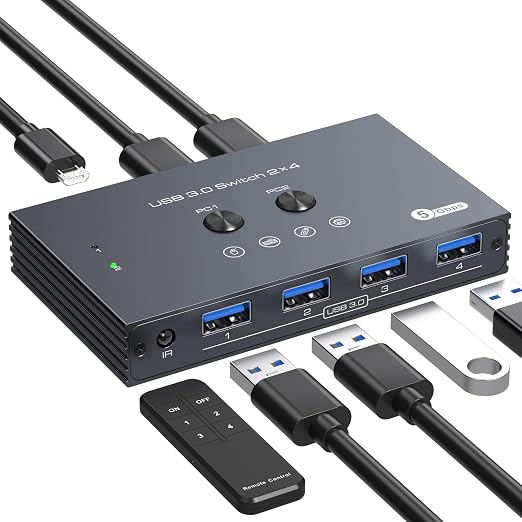
The XPTSFDU USB 3.0 Switch allows you to effortlessly share up to four USB peripherals between two computers, offering a convenient solution for multi-device management. Whether you're juggling keyboards, mice, printers, or scanners, it's designed to streamline your workspace and enhance productivity without the hassle of constantly unplugging devices.
Pros & Cons
- Pros:
- Easy Setup: Plug-and-play with no drivers required, making installation a breeze.
- High-Speed Performance: Supports up to 5Gbps data transfer rates, ensuring swift and efficient sharing of high-power devices.
- Versatile Control: Offers both button and IR remote switching for easy toggling between computers.
- Power Support: Includes a 5V Micro USB power port for stable operation with energy-demanding peripherals.
-
Wide Compatibility: Works seamlessly with Windows, Mac OS, and more.
-
Cons:
- Cable Length Limitation: Best suited for setups with input/output cable lengths of 2 meters or less.
- Limited Power Supply: External power might be necessary for hard drives and printers.
Comparison
Compared to other USB switches in the market, the XPTSFDU USB 3.0 stands out for its high-speed data transfer capability and the inclusion of an IR remote, which is a convenience not often found in similar budget-friendly models. Its direct competitors, like most basic USB switches, generally lack remote control features, and some offer lower transfer rates, making the XPTSFDU a competitive choice in terms of performance for its price range. However, in contrast to premium options, this model might not support longer cable setups or provide abundant power for every high-power device without the additional micro USB support.
User Tips / Usage Guide
-
Pair with Short Cables: To maximize data integrity and speed, use cables that are no longer than 2 meters.
-
Power Backup: For USB devices that require more power, like hard drives, consider using the Micro USB power port to ensure stability.
-
Organize Your Desk: Maintain a clutter-free workspace by positioning the switch centrally, so each device and computer is within cable reach.
-
Label Connections: Clearly label which USB ports correspond to which peripherals to simplify troubleshooting and management.
-
Use Remote Sparingly: While the IR remote adds convenience, if connectivity issues arise, switch manually as a backup.
-
Firmware Updates: Regularly check for firmware updates from the manufacturer to ensure optimal performance and compatibility.
-
Secure Connection: Regularly inspect cables for wear and tear to avoid interruptions during critical operations.
Conclusion
For the price, you get a versatile, efficient, and user-friendly USB 3.0 switch that effectively facilitates the sharing of peripherals between two computers. Where it really earns its keep is in its balance of practical features like high-speed data transfer and remote control capability combined with the budget-conscious design. It’s an excellent choice for home offices or shared workspaces seeking to simplify their device management without splurging on high-end alternatives. If you're seeking value and usability without sacrificing on essential functionality, the XPTSFDU USB 3.0 switch is a reliable addition to your tech arsenal.